> For the complete documentation index, see [llms.txt](https://shoppad.gitbook.io/blogstudio/llms.txt). Markdown versions of documentation pages are available by appending `.md` to page URLs; this page is available as [Markdown](https://shoppad.gitbook.io/blogstudio/readme/preview-your-article-on-different-sized-screens.md).
# Preview your article on different sized screens
Follow the steps below on how to preview your article on different-sized screens (like mobile).
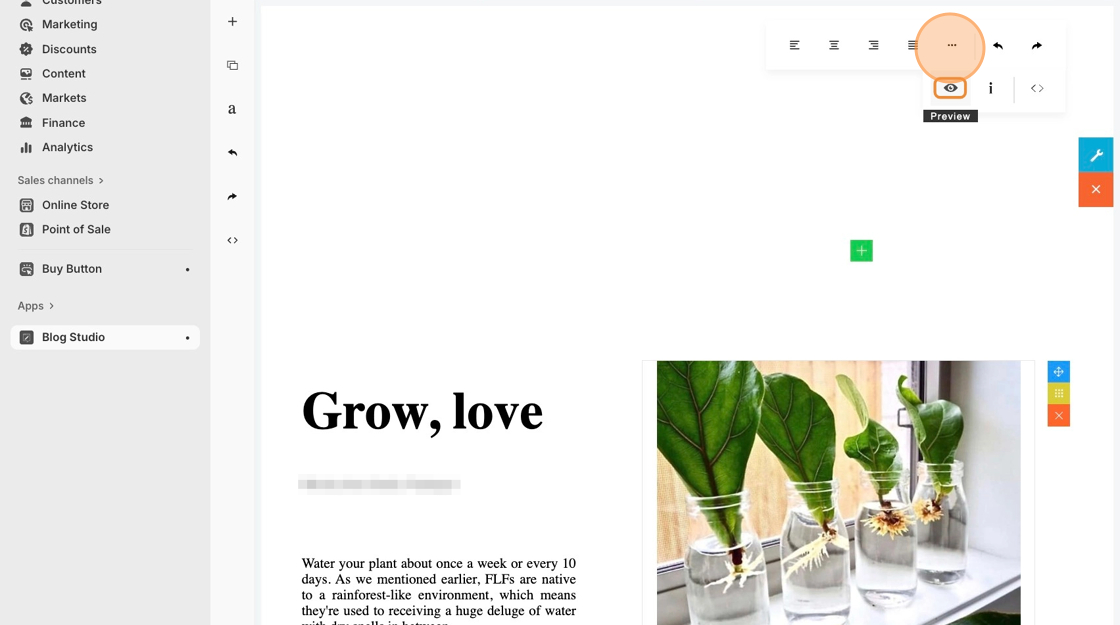
1. Starting from the Blog Studio editor, click on a content block on your article to reveal the top text toolbar.
2. Click on the **••• icon** to reveal more advanced settings in the editor, then click on the **Eye icon**.
3. Click on the gray top bar to freely adjust the view from mobile view to desktop view.
{% hint style="info" %}
If you would like to quit out of the preview mode, you can click on the **x icon** on the top right-hand corner.
{% endhint %}